Samsung Galaxy Themes
Screenshots
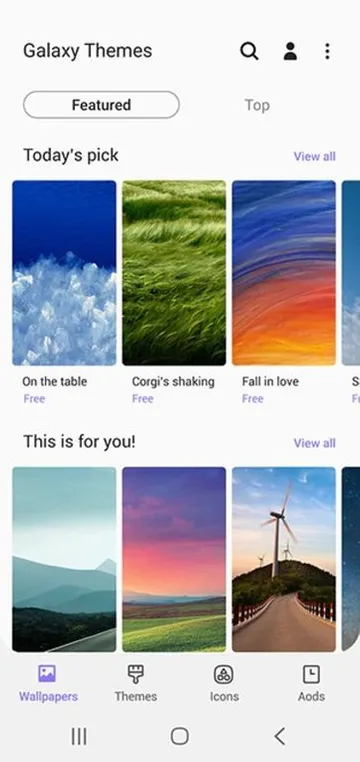
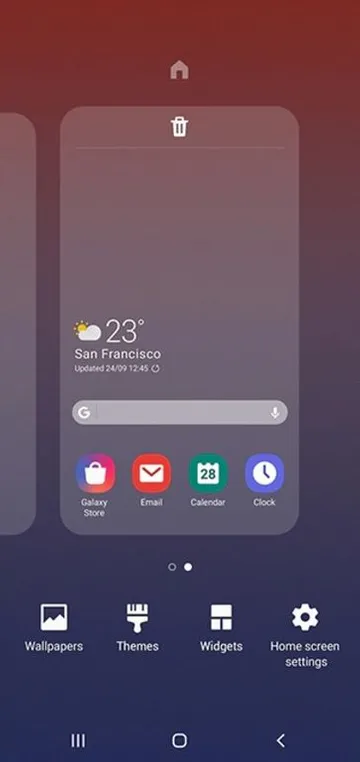
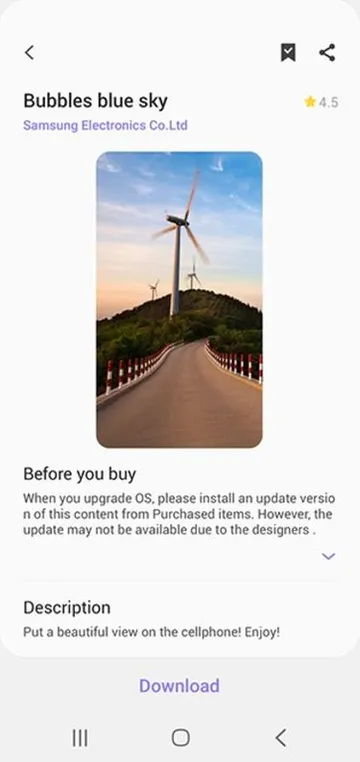
Samsung Galaxy Themes provides an excellent way to customize your mobile device interface. You can easily alter the appearance of your smartphone using this official tool. Moreover, millions of users decorate their screens with stunning layouts and personalized styles daily.
Consequently, changing the visual aesthetic makes your smartphone feel completely brand new. The application allows you to select customized fonts, color palettes, and default application icons seamlessly. Therefore, you can express your unique personality directly through your phone screen.
Key Features of Samsung Galaxy Themes App For Android
This application contains many exceptional tools that modify your user interface completely. Firstly, users can browse through a massive library of high-quality designs. You will find both free options and premium choices inside the marketplace.
In addition, the system integrates perfectly with your existing smartphone system configuration. As a result, applying a new style does not slow down your device performance. The application updates its catalog frequently to provide fresh content regularly.
Complete Wallpapers Collection
The application offers an extensive gallery of static and animated background images. Users can choose stunning landscapes, abstract art, or minimalist designs for their home screen. Furthermore, these backgrounds adapt perfectly to different screen resolutions.
You can also apply separate designs to your lock screen and home screen. Consequently, your phone looks dynamic and visually appealing every time you unlock the display. New graphics arrive in the store during seasonal holidays and major global events.
Custom Icon Packs
Standard application symbols can often look boring after months of continuous usage. Luckily, this tool allows you to replace default icons with beautifully crafted custom shapes. For instance, you can choose round, square, or neon-style graphic packages easily.
Moreover, the system modifies all native system icons automatically to maintain visual harmony. That is to say, your dialer, settings, and messages symbols will match the main aesthetic. Third-party applications also receive subtle design adjustments to fit the general theme.
Always On Display Designs
Many modern smartphones feature an unlit screen mode that displays the current time. This tool provides specialized graphics and custom clocks for that specific screen area. Therefore, you can view helpful information without fully waking up your mobile device.
Users can choose cute animations, subtle stars, or classic analog clock faces. Meanwhile, these custom graphics use very little battery power during daily operation. You can change these independent elements without altering your main wallpaper choice.
Personalized Text Fonts
Typography plays a massive role in how you experience your smartphone interface. This utility lets you download unique font styles that change all system text instantly. For example, you can select elegant script fonts or clean modern lettering.
In addition, you can adjust the size and boldness of the new lettering easily. As a result, reading text messages and system settings becomes much more comfortable. The new typography applies universally across the entire operating system interface.
Matching Sound Profiles
Visual changes become even better when they include complementary audio enhancements. Certain premium design packages alter your ringtones, notification tones, and system tap sounds. Consequently, your device gains a completely cohesive atmosphere that matches your visual style.
For instance, a sci-fi theme might add futuristic mechanical sound effects to your phone. On the other hand, a nature theme can introduce calming forest birdsongs. Users can enable or disable these custom audio packages within the settings menu.
Dynamic Themes
Dynamic options change their appearance based on the actual time of day. To clarify, the background might display a bright morning sky during the daytime hours. Then, the imagery shifts into a dark starry night after the sun sets.
This continuous transformation keeps your interface feeling alive and highly interactive. Furthermore, it helps reduce eye strain by automatically darkening your display in the evening. Many users prefer these automated choices for their daily phone configuration.
Animated Keyboard Layouts
The application lets you modify the appearance of your default stock keyboard completely. You can apply unique color schemes, button shapes, and background textures to your typing area. Consequently, sending text messages becomes a much more visually engaging experience daily.
Moreover, certain premium selections add subtle reactive glow effects when you press individual keys. As a result, typing long messages feels incredibly satisfying and modern on your device display. You can easily toggle these keyboard modifications inside the main settings menu.
Custom Call Backgrounds
Incoming phone calls can feature unique animations instead of standard blank background colors. This feature allows you to choose dynamic video clips or beautiful portraits for call screens. Therefore, you will see your favorite art styles every time someone contacts you.
In addition, you can assign specific background animations to individual contacts in your address book. Consequently, you will immediately recognize the caller even before reading their actual name text. The setup process remains highly intuitive and requires only a few quick taps.
Why Users Prefer Custom Interface Designs
Smartphone owners love to modify their devices to stand apart from the crowd. This tool offers an official, secure way to achieve deep system customization effortlessly. Therefore, you do not need to install unstable third-party launchers to modify your appearance.
Moreover, Samsung Galaxy Themes App integrates deeply with the original manufacturer interface environment. As a result, you will never experience sudden system crashes or noticeable battery drain. The entire customization process remains smooth, fluid, and highly optimized for daily use.
How to Download and Install Samsung Galaxy Themes APK
Getting the latest version of this customization tool requires a few simple steps. Firstly, you must locate a reliable online source to obtain the file. Click the download button to save the installation file onto your internal storage.
- Open the file manager application on your mobile phone.
- Locate the downloaded file inside your default storage folder.
- Tap the file once to initiate the system installer menu.
- Enable the installation option for unknown sources if the system shows a prompt.
- Follow the basic on-screen prompts to finish the setup process.
- Open the application from your app drawer to begin customizing your phone.
Samsung Galaxy Themes Tips and Tricks
- Mix and match different items by combining wallpapers from one style with icons from another.
- Check the daily free section regularly to download premium items without spending real money.
- Apply dark designs to increase battery life significantly on devices with modern organic LED displays.
- Use the preview function before purchasing or applying any extensive design packages to your phone.
- Save your favorite layouts to the wish list to track price drops and seasonal discounts easily.
- Keep the application updated to access the newest security features and design categories instantly.
Conclusion
To sum up, personalizing your smartphone interface has never been easier or more reliable. This official application provides all the necessary tools to create a beautiful digital space. You can easily modify icons, wallpapers, fonts, and system sounds within a single interface.
In conclusion, downloading the file gives you total control over the look of your smartphone. Give your device a fresh appearance today by exploring the vast catalog of creative designs. You will certainly enjoy a highly customized mobile experience that reflects your style.